
 I pride myself on keeping my inbox from getting out of control. I actually think of my email inbox as kudzu, which is a vine-type weed that grows at an unbelievably fast rate and will cover EVERYTHING if you give it the chance. You must stay on top of it in order to keep it under control. So yeah, my personal email is like kudzu! (image from theresilientearth.com)
The week before Layah was born, I started to be not quite as disciplined about getting through my emails each day. Frankly, I just had other things that needed my attention more. And then I went to the hospital for a few days to have her, followed by a few days back at home where I didn’t even open my account at all.
You can imagine what happened when I finally did check my email. It was OUT.OF.CONTROL. And 5 weeks later, I hadn’t recovered, and was still fighting a losing battle with my kudzu email. Here’s a screen shot of my unread email from a few days ago:

Yeah…395 unread messages. It was making me sick to my stomach, and was actually causing me to not want to check my email at all, which of course, only makes the problem bigger. Just when I was thinking that I would hate my email account for the rest of my life, I heard about UnRoll.me, which is a FREE online service that will categorize all of your email subscriptions for you and help you unsubscribe with ease, as well as keep all your subscription emails in just one daily digest.
Ok, so then I got signed up for UnRoll.me. You just need to give them your email address and permission to access some of your info. Then you sit back and wait while they compile all your subscriptions. I had to wait about 5 minutes for the system to compile all my data. Here’s the tally:
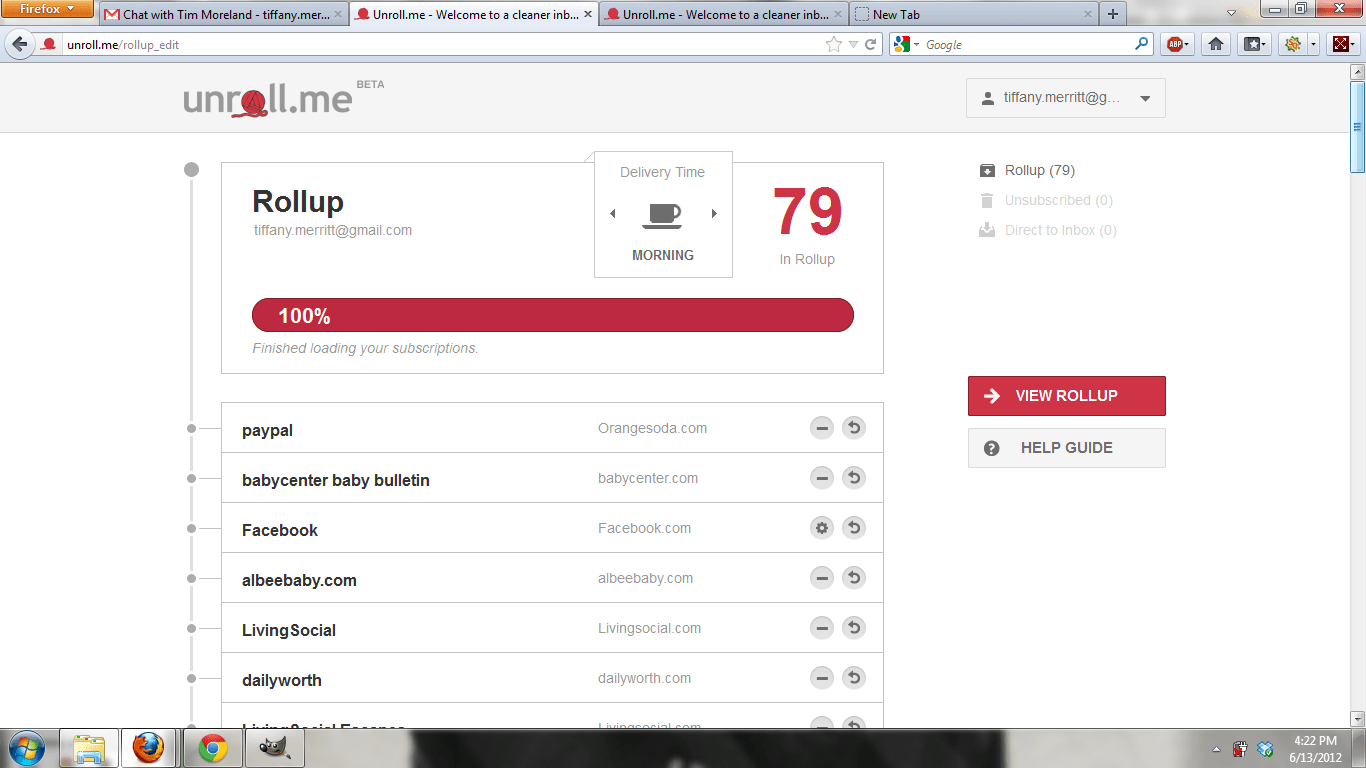
Yeah….I had 79 email subscriptions. GOODNESS! UnRoll.me had them all organized for my review, and they were even categorized into groups like deals and rewards, social, education, entertainment, etc. It was so cool!
And then it went from being cool to being BLOW YOUR MIND AMAZING. Because in about 3 minutes. Yes, 3 MINUTES I unsubscribed to 44 things. YEEEEESSSSSSS!!!!!!
This is work that I had been putting off, and if I had unsubscribed to all of these things in one sitting, even if I was super focused, it would have taken me at least an hour. And I probably would have hesitated a bit more and decided not to unsubscribe as many. But seeing just how many different types of emails I was getting gave me the strength to slash and burn!
Here’s the other cool thing that UnRoll.me does. For all those subscriptions that you’d like to keep, it gives you the option of getting them all rolled up into one email. You can take any of the subscriptions out that you’d like if there are some that you want to make absolutely certain you don’t miss. I took a few out that were important (stuff from my bank, for example). But the rest all come to me at one time, rather than throughout the day and night. UnRoll.me sends them my way every morning, so I know just when to expect them. It ROCKS! Now my inbox looks like this (note how few emails I get in a day now!):

The only problem I had with using UnRoll.me was that I didn’t have success getting it to work in Chrome. Every time I tried to choose my email type, it would start me over in the process. It worked flawlessly in Firefox, so I’m guessing it is just some little kink that needs to be worked out. I’m telling you this just in case you have any trouble with it. If so, don’t give up, just try a different browser!
Go forth, my friends, and revolutionize your inbox. Find the solution to your kudzu-like emails and tame them forever! You’ll be so glad you did.
Disclosure: I am a member of the Collective Bias™ Social Fabric® Community. This shop has been compensated as part of a social shopper insights study for Collective Bias™ #CBias #SocialFabric. All thoughts and opinions expressed here are strictly my own.